
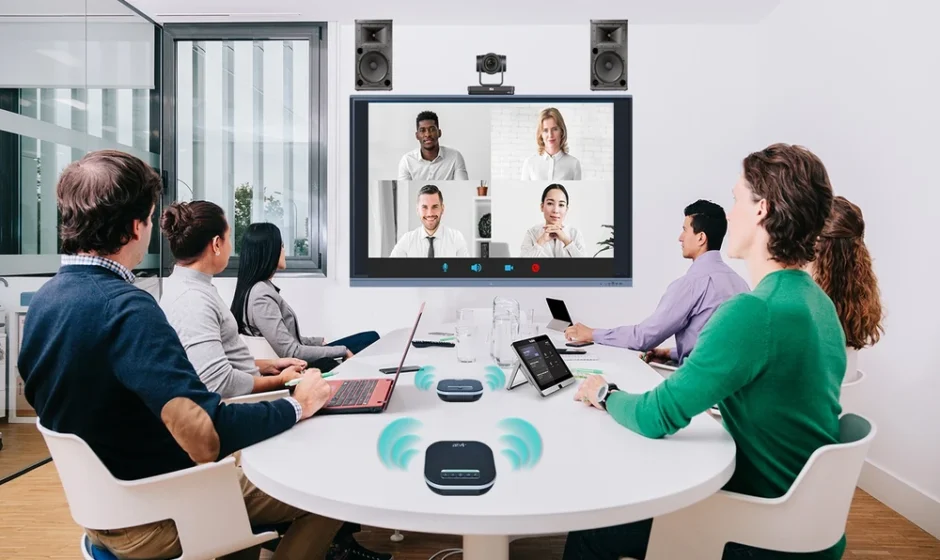

Businesses today rely on video conferencing to connect teams, communicate with clients, and manage operations across multiple locations. But as meeting rooms become more advanced, choosing the right technology is no longer just about buying a camera and microphone. Companies need reliable systems that integrate with their existing IT infrastructure and support seamless collaboration.
This is where a professional video conferencing solution provider makes a difference. From planning meeting room layouts to integrating Microsoft Teams Rooms, Zoom Rooms, displays, cameras, and audio systems, the right partner helps businesses build a conferencing environment that works reliably every day.
In this guide, we’ll explore what enterprises should look for when choosing a provider, the features that matter, and how the right solution can improve workplace collaboration.
What Does a Video Conferencing Solution Provider Do?
A video conferencing solution provider helps businesses design, implement, and maintain technology that enables high-quality virtual meetings. Depending on the project, services may include consultation, equipment selection, audio-visual (AV) integration, installation, configuration, testing, and ongoing technical support.
Unlike a supplier that simply sells conferencing equipment, an experienced provider considers how people will use the meeting room, the size of the space, acoustic requirements, network connectivity, and compatibility with existing collaboration platforms.
For example, a small huddle room may require a simple video bar, while a corporate boardroom might need multiple cameras, ceiling microphones, professional speakers, large displays, and automated room controls.
The goal is to create a complete solution that suits the business rather than forcing every meeting room to use the same setup.
Why Businesses Need Enterprise Video Conferencing Solutions
As organisations expand across offices, cities, and countries, consistent communication becomes increasingly important. Enterprise Video Conferencing Solutions help businesses connect employees, customers, partners, and stakeholders without requiring everyone to be physically present.
Here are some important benefits.
1. Better Collaboration Across Multiple Locations
Employees working from different offices need a consistent meeting experience. Enterprise conferencing systems make it easier to conduct presentations, share content, collaborate on projects, and communicate with remote colleagues.
A standardised setup also reduces the time employees spend figuring out how to start meetings or connect their devices.
2. Professional Meetings With Better Audio and Video
Poor audio, unclear video, and connection issues can make meetings frustrating. Professional conferencing equipment helps improve voice pickup, camera framing, speech clarity, and content visibility.
A properly designed AV system also accounts for room acoustics, display placement, lighting, and microphone coverage.
3. Seamless Integration With Collaboration Platforms
Businesses commonly use platforms such as Microsoft Teams and Zoom for internal meetings and external communication.
A capable video conferencing solution provider can help select compatible hardware and configure meeting rooms to work with the organisation’s preferred platform. This reduces compatibility issues and creates a more consistent user experience.
4. Lower Long-Term Operating Costs
Reliable meeting room technology can reduce repeated troubleshooting, unnecessary equipment replacement, and avoidable travel for routine meetings.
Businesses can also benefit from planned maintenance and centralised support, especially when managing conferencing systems across multiple offices.
Key Features to Look for in an Enterprise Video Conferencing System
Before selecting a provider, evaluate the features and capabilities your organisation actually needs.
High-quality cameras: Look for cameras that suit the room size and seating arrangement. Features such as automatic framing, speaker tracking, and intelligent camera switching may improve the experience in larger meeting rooms.
Professional audio: Microphones and speakers should provide clear speech throughout the room. Larger spaces may require ceiling microphones, additional speakers, acoustic treatment, or specialised audio processing.
Platform compatibility: Confirm that the proposed system supports your preferred conferencing platform, such as Microsoft Teams or Zoom, and meets its hardware and certification requirements.
Content sharing: Employees should be able to share presentations, documents, and other content without complicated connection procedures.
Room scheduling and control: Touch panels, room-booking integrations, and automated controls can make it easier to start meetings and manage room functions.
Security and manageability: Enterprise systems should support appropriate access controls, software updates, network security policies, and device management capabilities.
The best configuration depends on the number of users, room layout, meeting frequency, IT requirements, and available budget.
How to Choose the Right Video Conferencing Solution Provider
Choosing a provider is an important decision because the quality of the initial design and implementation affects the performance of the system over time.
1. Assess Your Meeting Room Requirements
Start by identifying how many meeting rooms need conferencing technology and how each space will be used. Consider room capacity, seating arrangements, remote participants, presentation requirements, and whether meetings involve external customers or internal teams.
A provider should assess these requirements before recommending equipment.
2. Check AV Integration Expertise
Video conferencing depends on more than software. Cameras, microphones, speakers, displays, connectivity, control systems, and room acoustics must work together.
Choose a provider with relevant AV integration experience who can design a complete system instead of recommending disconnected products.
3. Evaluate Platform and Hardware Compatibility
Ask whether the proposed solution works with your existing IT environment. If your organisation uses Microsoft 365, for example, Microsoft Teams Rooms may be suitable for dedicated meeting spaces. Zoom Rooms may be appropriate for businesses standardised on Zoom.
For mixed-platform environments, discuss interoperability requirements and any limitations before finalising the design.
4. Compare the Total Cost of Ownership
The purchase price is only one part of the investment. Consider installation, cabling, room modifications, software subscriptions, support contracts, maintenance, and future upgrades.
A transparent proposal should explain the recommended equipment, implementation scope, optional features, and recurring costs.
5. Review Installation and After-Sales Support
Even high-quality equipment can perform poorly when incorrectly installed or configured. Confirm that the provider offers commissioning, functional testing, user guidance, and a clear process for handling technical issues.
For large deployments, ask about service-level agreements, preventive maintenance, and support coverage across locations.
Enterprise Video Conferencing Solutions for Different Meeting Spaces
Different meeting rooms require different configurations. An experienced provider should design each space around its intended use.
Huddle rooms: Compact video bars with integrated cameras, microphones, and speakers can be suitable for small collaborative spaces.
Medium-sized meeting rooms: These spaces may benefit from dedicated cameras, improved microphone coverage, larger displays, and wireless content sharing.
Boardrooms and executive meeting rooms: Larger spaces often require advanced camera systems, distributed microphones, professional audio processing, multiple displays, and integrated room controls.
Training rooms and auditoriums: Depending on their purpose, these environments may need multiple cameras, wireless microphones, presentation systems, recording capabilities, and more advanced AV control.
Planning for each room type helps businesses create consistent experiences without overspending on unnecessary equipment.
Why AV Integration Matters for Enterprise Conferencing
A video conferencing system should operate as part of the wider workplace technology environment. AV integration brings conferencing equipment, displays, room controls, audio systems, and connectivity together into a coordinated setup.
For organisations with multiple meeting rooms, good integration also supports standardisation. IT teams can establish consistent configurations, simplify troubleshooting, and plan future upgrades more effectively.
A professional provider can assess existing infrastructure, identify compatibility issues, and recommend improvements based on business requirements.
Why Choose Presentation People for Video Conferencing Solutions?
Presentation People helps businesses explore professional video conferencing and audio-visual solutions for modern workplaces. Whether you’re planning a new boardroom, upgrading existing meeting rooms, or improving collaboration across offices, selecting the right technology starts with understanding your requirements.
A well-planned conferencing project should consider room design, hardware compatibility, platform integration, installation quality, usability, and ongoing support.
If your organisation is planning a meeting room upgrade or a larger conferencing deployment, the Presentation People team can help you explore suitable options for your workspace.
Looking for a video conferencing solution provider for your business?
Visit Presentation People’s Video Conference Solutions page to learn more and discuss your enterprise requirements.
Frequently Asked Questions
What is a video conferencing solution provider?
A video conferencing solution provider helps businesses select, design, install, integrate, and maintain conferencing technology, including cameras, microphones, speakers, displays, and collaboration platforms.
How much do enterprise video conferencing solutions cost?
Costs depend on room size, equipment requirements, platform licensing, installation complexity, and support arrangements. A site assessment and detailed proposal can help establish a realistic budget.
Which video conferencing system is best for enterprise businesses?
The right system depends on your collaboration platform, room configuration, security requirements, budget, and user needs. Microsoft Teams Rooms and Zoom Rooms are two options worth evaluating for dedicated meeting spaces.
Can video conferencing systems be integrated with existing AV equipment?
Yes, many systems can integrate with existing displays, audio equipment, cameras, and room controls. However, compatibility should be assessed before deployment to avoid performance issues or unexpected replacement costs.
What should businesses look for in an enterprise video conferencing provider?
Evaluate AV integration expertise, platform compatibility, equipment recommendations, installation capabilities, technical support, maintenance options, and the provider’s ability to support future expansion.